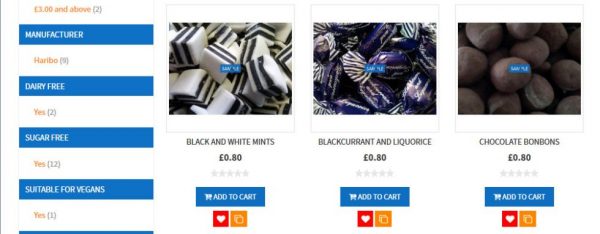
One of the first things you should plan for when setting up a Magento site is the product attribute and attribute groups, especially before you start adding products.
By default Magento comes with some pre-defined attributes but you should carefully examine your product types and either modify the existing attributes or create specific new ones. Consider what the end user will find useful in searching/filtering your products, the easier and clearly the end user can find the product the more likely they are use your website. if finding the product they are after is complex and difficult the more likely they are to leave your website and find it elsewhere.
New Product Attribute
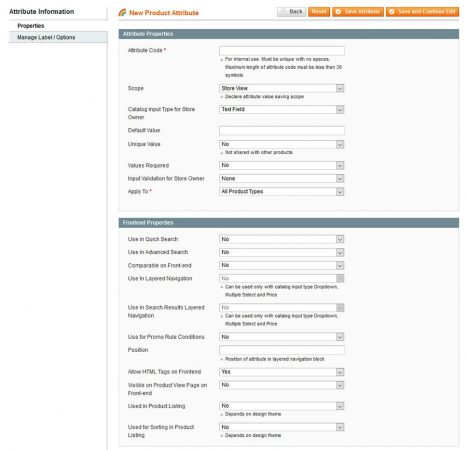
Attribute Properties
| Attribute Code | This is used for internal use, must be unique with no spaces, to name the attribute i.e ‘mens_shoe_sizes’ |
| Scope | Sets how the attribute will be saved for use within, choices are Global, Website or Store View |
| Catalog input type for store owner | Sets the type of data the attribute will store, options are:
|
| Default Value | Depending on the catalog input type selected a default value field might appear, in which you can input the default value to be used |
| Unique Value | Will this attribute be unique for each product |
| Values Required | Yes/no will a value need to be supplied |
| Input Validation for Store Owner | Should the inputted data be validated when entered by the store owner, if no validation required selected no, otherwise choose from the validation rules. |
| Apply To | Determines for which product types this attribute will display. Either All products or you can choose to only apply to certain product types(simple, grouped, configurable, virtual, bundled,downloadable) |
Frontend Properties
| Use in Quick Search | Yes/No, if yes the data saved within this attribute will be searchable via the quick search section on the front-end |
| Use in Advanced Search | Yes/No, if yes the data saved within this attribute will be searchable via the advance search section on the front-end |
| Comparable on Front-end | Yes/No, if yes this attribute will be shown on the product comparison section if one of the products contains this attribute |
| Use in Layered Navigation | Can be used only with catalog input type Dropdown, Multiple Select and Price |
| Use in Search Results Layered Navigation | Can be used only with catalog input type Dropdown, Multiple Select and Price |
| Use for Promo Rule Conditions | Yes/No |
| Position | Position of attribute in layered navigation block |
| Allow HTML Tags on Front-end | Yes/No |
| Used in Product Listing | Yes/No (depends on design theme) |
| Used for Sorting in Product Listing | Yes/No (depends on design theme) |
Manage Label / Options
| Manage Titles | This is the label that will be shown, you can have different labels for each store if you have setup multiple stores |
Example Attribute
As a example I am putting together a test Magento site, in which I will be creating a custom theme based on the rwd theme, this test site will be a online sweet shop, looking at the product ranges offered some of the product attributes that I would be creating are:-
- Dairy Free
- Gluten Free
- Flavour
Dairy Free Attribute Example
| Attribute Code | diary_free |
| Scope | Store View |
| Catalog input type for store owner | Dropdown |
| Unique Value | No |
| Values Required | No |
| Input Validation for Store Owner | None |
| Apply To | All Product types |
| Use in Quick Search | Yes |
| Use in Advanced Search | Yes |
| Comparable on Front-end | Yes |
| Use in Layered Navigation | Filterable (with results) |
| Use in Search Results Layered Navigation | Yes |
| Use for Promo Rule Conditions | No |
| Position | 0 |
| Allow HTML Tags on Front-end | No |
| Used in Product Listing | Yes |
| Used for Sorting in Product Listing | No |
| Manage Title (Admin) | Dairy Free |
| Manage Options (Admin) | No |
| Manage Options (Admin) | Not Specified (Default) |
| Manage Options (Admin) | Yes |
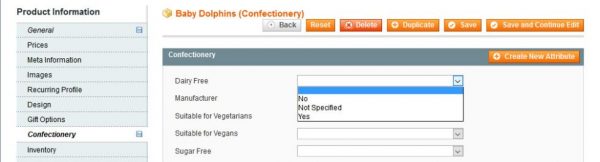
Using these settings I have created a dropdown attribute for ‘Dairy Free’, which I can specify for each product, this in turn will allow the products on the front-end to be filterable by this attribute.
Attribute within the admin area
Front end